

LinkedIn leads can be expensive. Plenty of B2B companies pay hundreds of euros for every one. But much of that cost doesn't come from your audience. It comes from the settings inside your campaigns.
Here are five changes that can cut your LinkedIn cost per lead by up to 21%, so you get more leads from the same budget.
Prefer to watch? The full walkthrough is on YouTube: How to cut your LinkedIn Ads cost per lead by 21%
At eContent we've run LinkedIn ads for clients for years. In June, one campaign brought a client 81 leads at an 8% conversion rate, generating over €400,000 for the business.
Step 1: Turn off audience expansion
In LinkedIn Campaign Manager, start a new campaign and pick your objective carefully. For lead generation, choose Lead generation. It's hard to change later, so get it right first time.
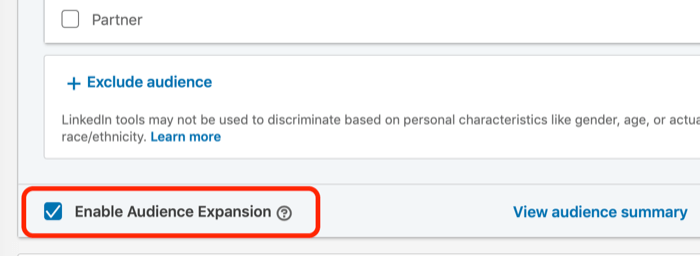
The biggest savings come in the ad set settings. Before you touch targeting, find Enable audience expansion and switch it off.
With it on, LinkedIn shows your ads to people outside your targeting. You get more impressions and clicks, but that extra traffic isn't your target market, so it's worthless to you.
Bonus tip: check the forecast panel. For a high-ticket B2B offer, aim for an audience of roughly 50,000 to 350,000 people. At 1.5 million, your budget won't reach enough of them often enough.
You want fewer impressions and fewer clicks, from people who can actually buy.
Step 2: Target seniority and experience, not job titles
Targeting exact job titles like "CEO" or "Head of Marketing" looks like an easy win. But people write their titles in many ways: "CEO and Founder", "Head of Growth Marketing". Every variation you miss is a buyer you never reach.
Instead, go to Audience attributes → Job experience and use these settings:
Job seniorities: select Owner, Partner, CXO and Director
Exclude: Unpaid and Training seniorities
Years of experience: 6 to 12+ years
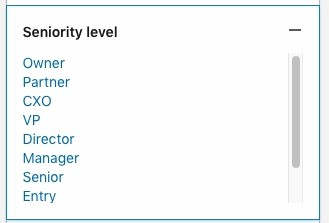
This reaches the decision makers who can buy a high-ticket service, whatever their exact title says.
Step 3: Keep people on LinkedIn with lead gen forms
LinkedIn doesn't want users to leave, and you tend to pay more when you send them to your website.
So build your landing page inside LinkedIn instead, using a Lead Gen Form. When someone clicks your ad, the form opens right there. It can include:
A short description of your product or service
Qualifying questions, such as years in the role or whether they make the buying decision
Their contact details, pre-filled from their LinkedIn profile
Afterwards they can visit your website or keep scrolling. You get the lead without the extra cost of sending them off LinkedIn.
Step 4: Refresh your creative every 2 to 3 weeks
With a tight audience of around 200,000 people, the same ad wears out fast. Refresh your ads every two to three weeks, and a month at the absolute most.
The easy way: take your best-performing ads and make variations of them, or test angles you haven't tried yet.
And whenever you talk to prospects, note the words they use to describe their problem. Put that language straight back into your ads. It's one of the strongest ways to lift both engagement and conversion rates.
Step 5: Retarget video viewers with lead form ads
This is where the biggest saving comes from. Most of your audience has never heard of you, so asking them to fill in a form straight away is expensive.
Instead, split the job in two:
Top of funnel: run short video ads that explain who you are and what you do. Push them to as much of your target market as possible, so each person sees them three to five times over a month.
Bottom of funnel: retarget the people who watched with your Lead Gen Form ad. They already know you, so they're far cheaper to convert.
Done well, this can cut your cost per lead by up to 21%. When LinkedIn launched video and lead form retargeting, software company TOPdesk reported that its cost per conversion fell by 24% (LinkedIn, TechCrunch).
Want lower LinkedIn costs without the trial and error?
Testing audiences and refreshing creative every few weeks takes time, and one wrong setting can burn through your budget fast.
Book a free strategy call and we'll look at your targeting, your offer and what a LinkedIn campaign could deliver for you.
Want to see a campaign in action first? Read how we raised €952,000 for an EIIS fund with paid ads, including how we kept Meta leads at €7.